
Key takeaways
- Choose products you can produce profitably during the Christmas rush. Offer ornaments, mugs, apparel, and keepsakes shoppers can customize with names, photos, or messages.
- Give shoppers a reason to spend more. Offer matching gift sets and paid personalization upgrades. Use a product personalizer to make navigation easier.
- Let customers preview their gifts and check spelling, photos, and placement before ordering. Review production files to prevent avoidable remakes and returns.
- Match your printing method to your deadline. Choose DTG, DTF, embroidery, or engraving based on the product, design, and order volume. Include production and shipping time when setting Christmas cutoff dates.
- Send the right gift offer to the right customer. Bring back past buyers with fresh designs, suggest gifts that complement recent purchases, and run Christmas campaigns with clear order deadlines.
To sell more custom gifts on Shopify this Christmas, show shoppers what they can personalize, make the finished design visible before checkout, and give them a reason to buy a matching gift.
A customer choosing a mug with a grandparent’s name has the potential to buy other family-focused gifts, if only they are at their fingertips. That gives you a specific offer to make in this rush. According to Shopify, bundles can increase average order value. So, for this Christmas, work on three parts of the sale:
Help shoppers choose with gift examples and clear personalization options.
Earn more per order through matching sets and paid extras.
Prepare for demand with design checks, suitable production methods, and realistic order deadlines.
To explore product ideas, print methods, and upsell strategies for holiday shoppers, stay with us to the end and get to know all of it
Why Do Custom Gifts Sell Better During Christmas?
Custom gifts can appeal to Christmas shoppers because they help buyers choose something specific to the person receiving it. A name, family photo, or shared memory gives the gift a personal connection. For your Shopify store, that creates a clear selling angle: show customers how they can make the gift feel chosen for someone they know.
Evidence shows strong demand for customization. According to Etsy’s 2024 annual report, approximately 30% of its marketplace gross merchandise sales came from custom or made-to-order merchandise.
Here’s how you can use that appeal in your Christmas collection:
Make the recipient easy to picture. Show a completed design with a meaningful name or message so shoppers can imagine their own version.
Explain what makes it personal. Specify whether buyers can add a photo, change the wording, or choose details that suit the recipient.
Make customization easy to follow. Keep the available choices clear and let shoppers review their design before ordering.
Best Custom Gift Products to Sell This Christmas
Personalized ornaments, drinkware, sweatshirts, and photo gifts are the best Christmas gifts to sell this Christmas. When comparing Christmas gift ideas for Shopify stores, prioritize products with enough room for names, photos, or a short personal message. Choose the categories that fit your customers’ budgets and your ability to produce and deliver each order.
Here’s a full list of the best custom gift products to sell this Christmas:
| Gift category |
Personalization to offer |
How to position it |
| Christmas ornaments |
Names, dates, family photos |
Mark a baby’s first Christmas, a new home, or a couple’s first holiday together. |
| Mugs and drinkware |
Names, short messages, pet illustrations |
Create gifts for teachers, coworkers, or relatives with wording suited to each recipient. |
| Sweatshirts and hoodies |
Embroidered initials, family names, printed designs |
Offer coordinated family clothing with an individual name on each piece. |
| Photo prints and blankets |
Family pictures, pet portraits, short dedications |
Help shoppers turn a photo they already love into a gift they can display or use. |
To choose the best custom products to sell online, compare the selling price with the cost of the blank item, personalization, packaging, and fulfillment.
That is the sort of customized gifts shoppers can’t resist, especially for an occasion like Christmas. This is the time when they need to put together thoughtful gifts. So when your catalog includes products that combine thoughtfulness and usefulness, shoppers will get exactly what they need from your store.
But before adding any of these categories to your store:
Order a sample with the personalization you intend to sell.
Calculate your margin after customization, packaging, and shipping costs.
Confirm production lead time; the time needed to make the order before shipping.
How to Increase AOV With Custom Products This Christmas
Increase average order value (AOV) by offering meaningful personalization upgrades and reasons to buy several gifts together. For Christmas 2026, put those choices directly on your product pages.
To increase AOV with custom products:
Make an extra detail worth paying for: Offer a personal message, photo customization, or another print location.
Help shoppers buy for more people: Present matching gifts for couples, families, and coworkers.
Make the gift ready to give: Offer a paid gift box or packaging upgrade that you can fulfill.
Reward larger orders: Set quantity discounts while keeping your customization charges profitable.
However, setting all these up can take a lot of time when you are dealing with high traffic. Here, a Shopify product personalizer like InkyBay can be your best choice. It lets you attach prices to selected options, set up customized products, offer hands-free customization, and manage quantity discounts all in one dashboard.
You must set customization options before Christmas. This way, customers can choose their extras and see updated pricing while shopping, and you can save your team from calculating each combination manually.
How to Increase AOV with InkyBay
Saving time and offering unlimited customization possibilities is the best way to increase AOV this Christmas. And InkyBay features do exactly that. The features are easy to set up and customer-friendly. Here’s a step-by-step guide to set up InkyBay features to increase AOV:
Step 1: Install InkyBay
Open your Shopify store admin. Go to Apps from the sidebar, search for InkyBay, and install it. Complete the app setup and select a plan that supports the number of products, print sides, and monthly custom orders you expect.
InkyBay currently offers a 21-day free trial, so you can check exactly how it fits your store.
See the detailed installation process here.
Step 2: Add a Custom Product
If you don't already have a customized product, add a new configured product.
Go to the InkyBay dashboard and click the “products” option to access all the products you have.
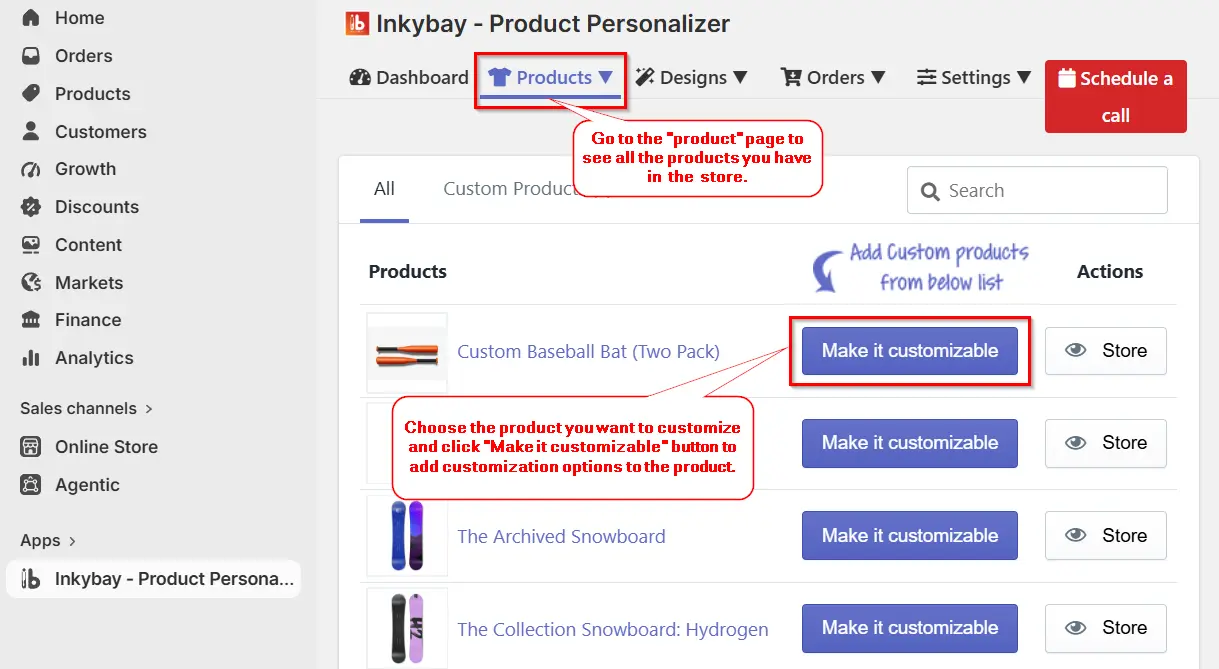
You can either configure an existing product or add a new product for Christmas and then customize it.
Once you select the product you want to customize, click the “Make it customizable” button, and a new page will appear where you can add customization options and prices.
Step 3: Add Size, Colors, Printing types
Once a new page appears in front of you, you can add sizes, colors, and printing types, and add prices to every size and color. This dynamic pricing helps you to change prices for any new color you might bring, especially for Christmas.
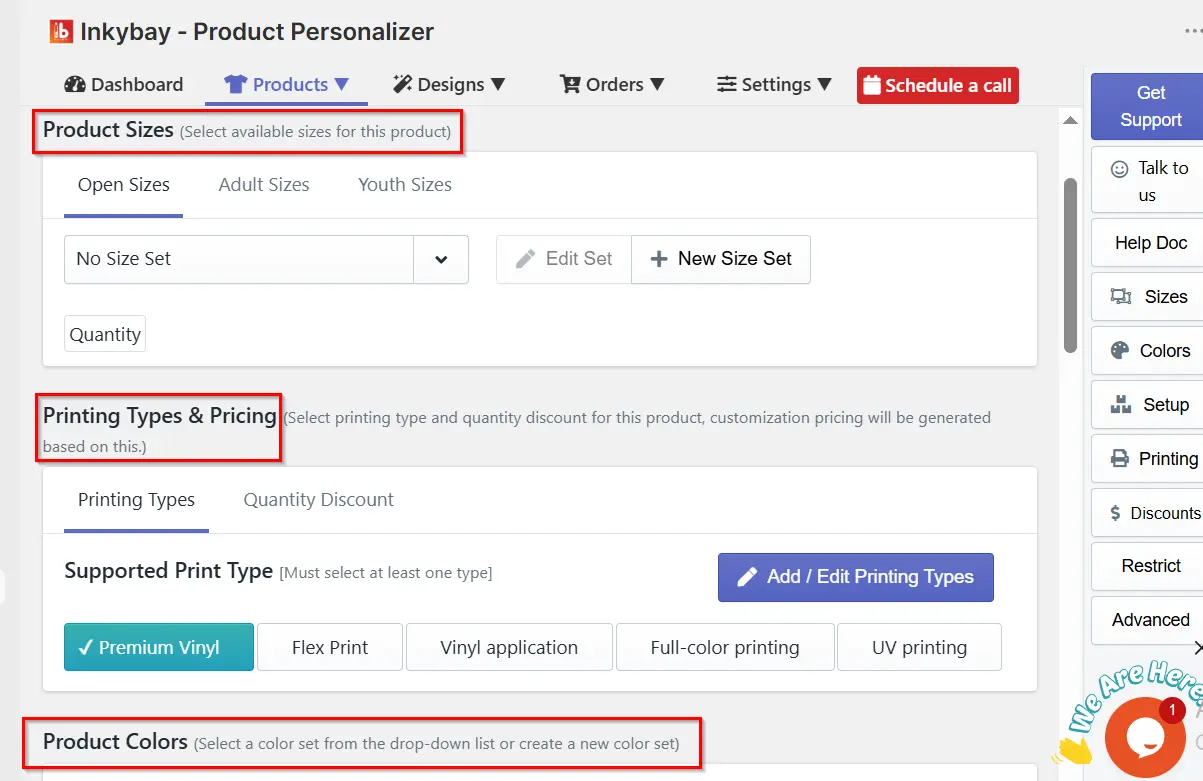
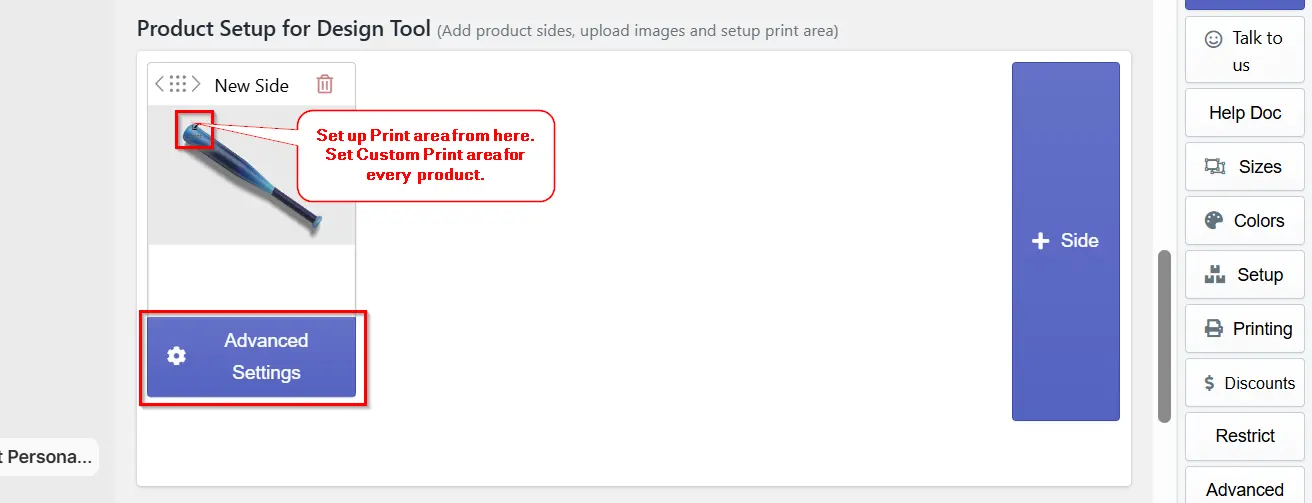
You can also offer complex configuration options and let customers personalize different parts of the product through the Advanced settings.
Step 4: Set up Product Options For Christmas
Option sets are the best way to increase AOV in this holiday rush. InkyBay’s option sets can do just that. Go to the InkyBay dashboard, hover over Products, and click on “Product Options”.
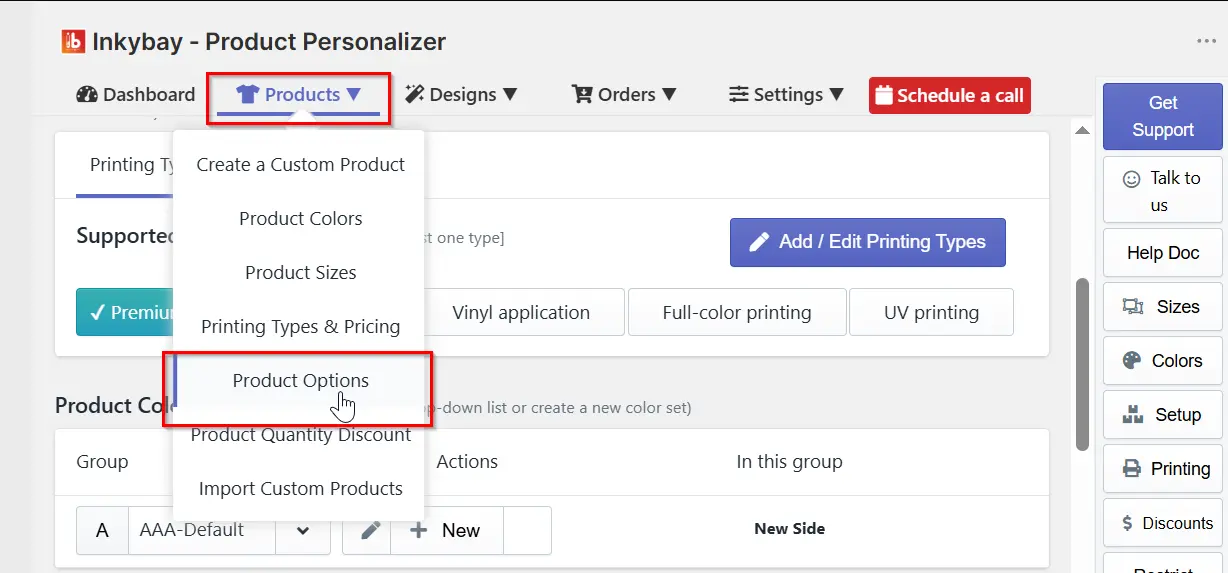
A new tab will open where you can create a new option set for the product. Simply click on the “+option set”/”Add new option set”.
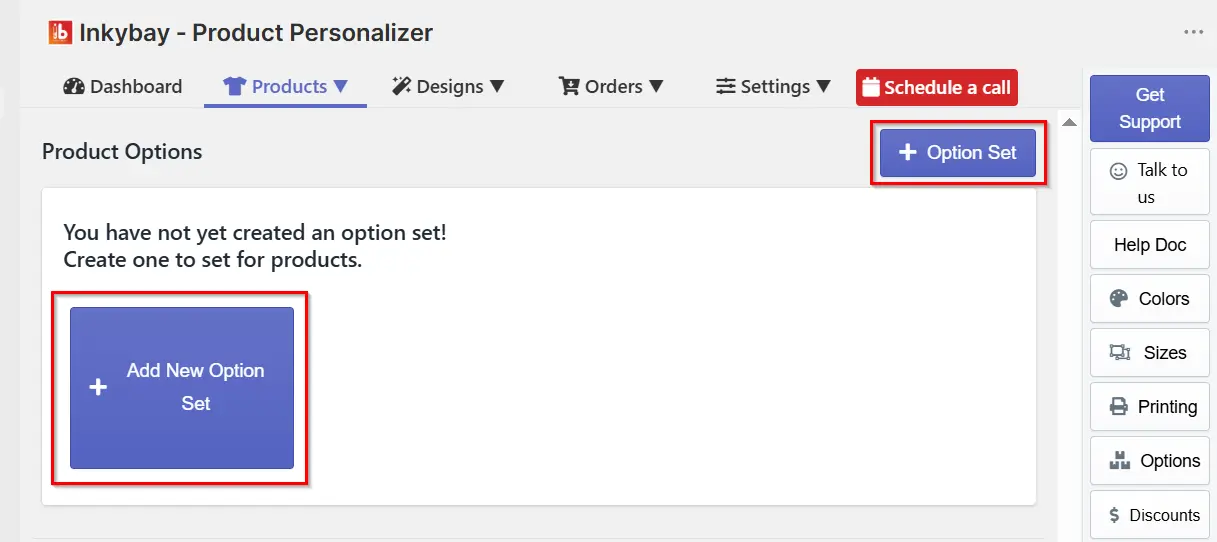
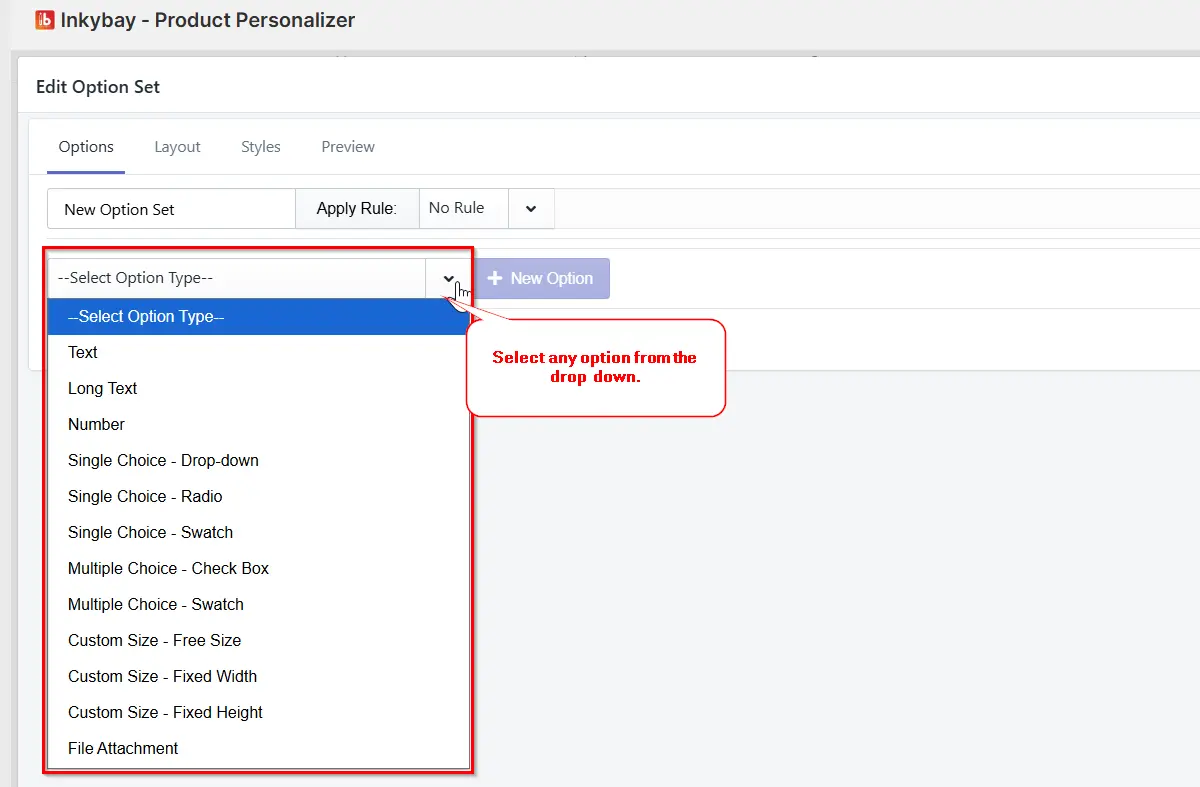
You'll now see all the options you can add to products. From simple text to multiple dropdown options, or even child options.
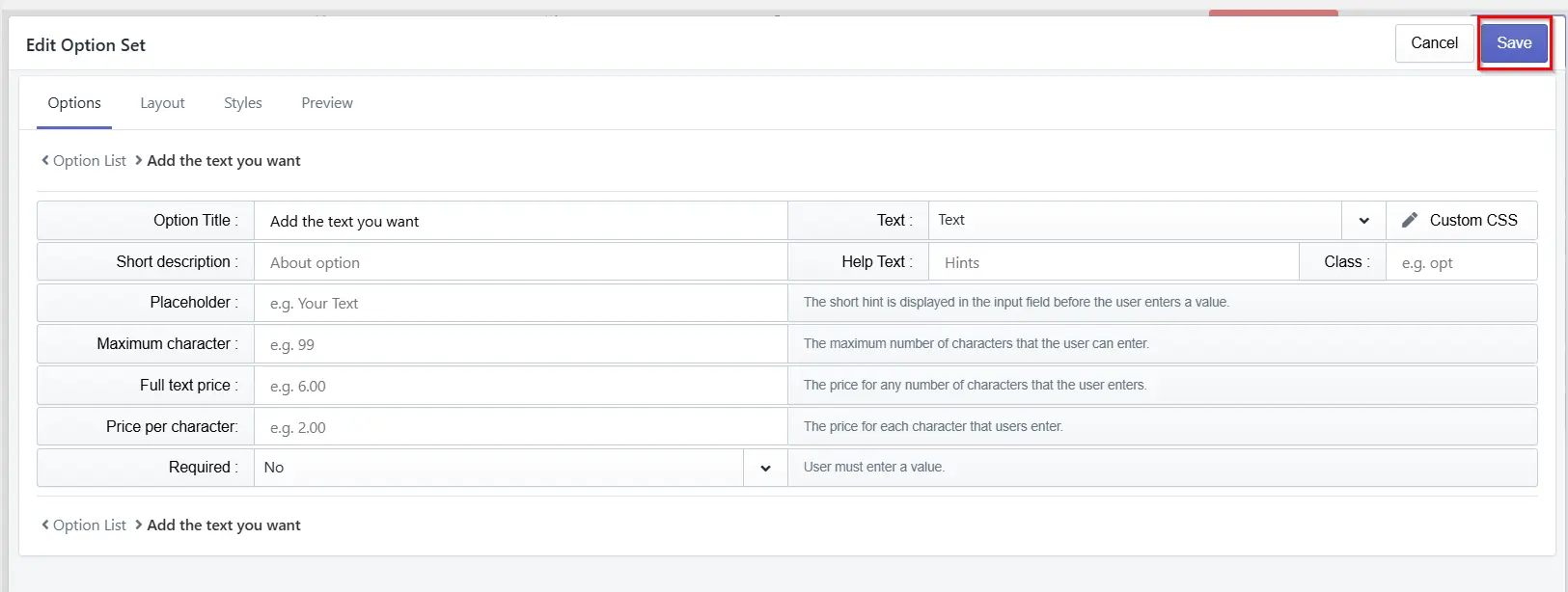
Once you have chosen an option, you can edit it as needed. You can change the text that would appear on your product page, add help text to guide customers, or make the option required. Once done with all the edits, click “save” to save all the changes.
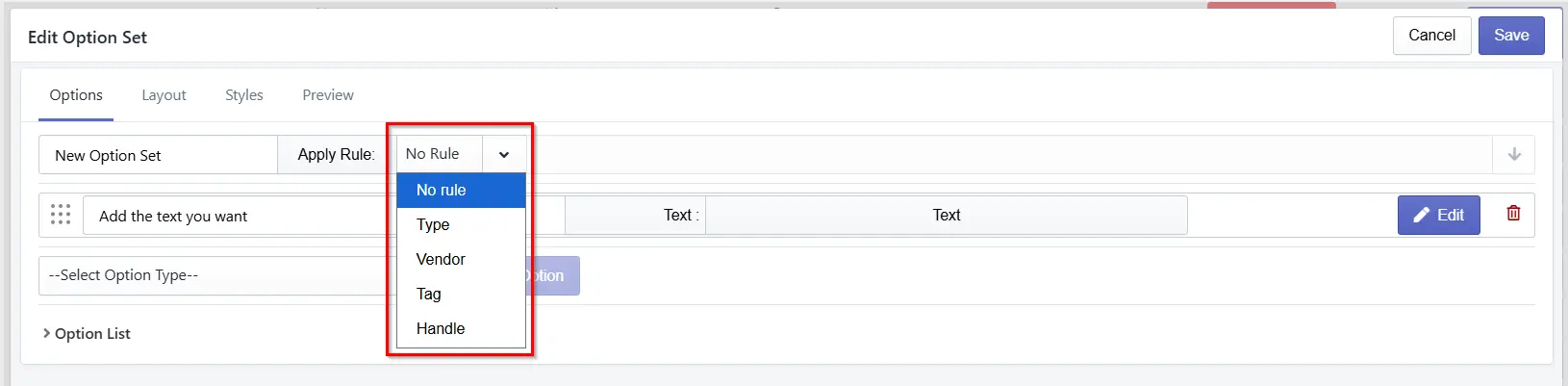
You can apply these Option sets automatically to a product based on conditions. Just by clicking on the “edit” button, you can see the “Apply rule” button where you can apply the conditions.
With InkyBay, you can enable “child” options, meaning you can show additional options based on the customer’s selection.
This is where you can add additional personalization options and really increase the overall order value. For example, if a customer selects a “Christmas gift set for parents,” you can add a child option for “gift wrappers” or “wrapping” and charge for it. It is highly likely that customers would want to wrap the gift before buying; you just need to direct them towards it.
Step 5: Set Up Quantity Discounts
This is the jackpot; you must use this Christmas. Offer quantity discounts on product sets or bundles. Christmas shoppers love purchasing bundles. This is the time everyone wants to show gratitude to the family, and you can step right into it just by offering reasonable quantity discounts.
To add quantity discounts with InkyBay, hover over the “Products” section and click on the “Product Quantity Discount” option.
Once the quantity discount page opens, you can edit or add a quantity discount by clicking on the “+ quantity discount” button. There, you can set the quantity discount. Click the “Save” button when you are done making changes.
To apply this quantity discount to the product, go back to theproduct page > find the product you want to apply the discount to > click the Edit button or the “Make it Customizable” button > scroll down to the Printing Types & Pricing section > click “Quantity Discount”.
Here you can find the discount you can create and just assign it directly to the product. Or you can create a new quantity discount right from here by clicking “Add/edit quantity discount”.
With that, you can show a quantity discount on your product page.
Step 6: Test All the Options on the Product Page
Once you've added all the options to increase AOV, test them. To ensure your product options appear smoothly and the design lab works perfectly, test them.
Click to view in the designer to test the options.
How to Choose the Right Print Method for Christmas Orders
Choose your method by material, design, and available production time. For Christmas 2026, ask your supplier to quote the full order quantity before setting a cutoff date. DTG and DTF suit printed apparel; embroidery adds stitched detail; engraving suits compatible hard goods.
DTG printing: Choose it for detailed designs on cotton apparel and individual custom orders. Confirm the supplier’s holiday production queue.
DTF printing: Consider it for designs across different garment materials. According to Printful, DTF supports cotton, polyester, nylon, and blends. For larger orders, check transfer supply and pressing capacity.
Custom embroidery: Offer it for initials or small designs on sweatshirts and hats. Have your supplier approve the stitch file and quote production time before accepting bulk orders.
Laser engraving: Use it for names and messages on compatible wood, glass, or metal gifts. For repeat items, ask about batch fixtures.
If you sell print-on-demand Christmas products, confirm your supplier’s production and shipping schedule before advertising a Christmas delivery date.
Christmas Marketing Strategies to Sell More Custom Gifts
To sell more custom gifts this Christmas, reach shoppers with a specific recipient in mind, send them to a matching gift collection, and follow up before your order deadline. Give each promotion a clear offer, a relevant product page, and a way to track purchases. Also, build your Shopify holiday marketing strategies around three customer groups: past gift buyers, shoppers who left without ordering, and recent customers buying for another recipient, to get the best results. Here are a few more tips that actually work:
Run a specialized Christmas campaign that helps shoppers choose. Launch a “Find Their Christmas Gift” campaign with options like family, friends, and pets. Send each group a short selection of relevant products, show how to personalize one, then follow up with its order deadline. Use a Christmas sales campaign plan to schedule your promotions throughout the season.
Turn last year’s purchase into this year’s tradition. Find customers who bought personalized ornaments last Christmas and haven’t ordered again. Send them this year’s designs with an invitation: “A new year deserves a new place on the tree.” Link directly to the collection and remove buyers from the reminder sequence once they order.
Sell the next gift on their list. After a customer buys a personalized family gift, send a separate suggestion for grandparents featuring the same product style. Show a finished example and the price upfront. Keep this follow-up separate from cart recovery so customers receive an offer that matches what they’ve already bought.
Give repeat buyers first choice of Christmas designs. Invite returning customers to shop your seasonal designs before the public launch. For shoppers who usually buy with coupons, test a multi-gift offer instead. Track the profit each offer leaves after production and shipping before extending it to more customers
Create separate order deadlines for engraved, embroidered, and printed gifts. As each deadline approaches, contact shoppers who viewed those products but didn't purchase. Once a deadline passes, update your ads and emails to feature gifts still available for Christmas delivery.
Conclusion
Selling more custom gifts this Christmas starts with making each order easy to place and realistic to deliver. Choose products your team can produce well, price personalization to protect your margins, and match promotions to your production deadlines. Give shoppers a clear view of what they’re buying, then offer thoughtful extras that make their gifts worth spending more on.
Before launching your Christmas campaign, place a test order yourself, check the design through to production, and confirm your delivery promises. Get those details right before bringing more shoppers to your store.
Frequently Asked Questions
What are the best custom gifts to sell on Shopify for Christmas?
Personalized ornaments, photo mugs, embroidered sweatshirts, engraved keepsakes, and custom blankets are strong Christmas gift options. Choose products that fit your customers’ budgets and your production capacity, with room in the price to cover personalization and fulfillment.
How do I add personalized products to my Shopify store?
Install a product personalizer, connect it to your products, and configure text fields, photo uploads, design areas, and pricing. Test the customer preview, checkout, and production file before publishing the products.
What print method is best for custom Christmas gifts?
DTG suits detailed designs on cotton apparel, while DTF works across cotton, polyester, and blends. Embroidery suits stitched names and monograms; engraving suits compatible wood and metal keepsakes. Choose according to the material, design, and production time available before Christmas.
How can I increase sales of custom gifts during the holidays?
Target past gift buyers, show finished personalization examples, and offer matching gifts or paid upgrades. Follow up with interested shoppers before the relevant order deadline, and direct each campaign to products you can still produce and deliver on time.
Does product personalization reduce returns?
Personalization can help reduce returns caused by design misunderstandings when customers review a live preview before ordering. Ask buyers to check spelling, photos, and placement, then check the production file against their order. Accurate sizing and production quality still matter.
Which Shopify app is best for personalized Christmas products?
InkyBay is a strong choice for Shopify sellers who need live design previews, pricing that updates with customization, and downloadable production files. Its product options and quantity discounts also support paid personalization upgrades and multi gift orders.


