

Key Takeaways
- Cart abandonment refers to when customers add products to their cart but don’t complete the purchase for various reasons.
- Common reasons for cart abandonment include complex checkout, mandatory sign-up, fitting room behavior, and a lack of perceived ownership.
- Reduction tactics include treating checkout as a workspace, creating a sense of ownership, reducing anxiety before checkout, and leveraging the Zajonc effect.
Cart abandonment is not just an ecommerce inconvenience; it’s a leak in your system that drains billions of potential revenue every year. The issue is not the customers who abandon their carts; it’s more about how little we know about cart abandonment.
Every other blog you search to resolve the issue of cart abandonment will tell you about guest checkouts, shipping costs, lock checkout processes, and more. Are these important? Yes, definitely, but do those portray the complete scenarios? Absolutely Not!
It’s because recent behavioral studies found more than just the typical things we see. The cart abandonment caused by uncertainty, identity conflict, and choice pressure remains an underexplored topic for e-commerce owners. If you are a personalized business owner looking to reduce cart abandonment rates, you must have a deep understanding of the underlying reasons and how to resolve them effectively. In this blog, we have addressed all the underlying and lesser-known issues and provided insights on how to actually solve them. So, discover the psychology of cart abandonment and how you can effectively reduce cart abandonment rates with research-backed ways.
What is Cart Abandonment?
Cart abandonment refers to the situation where customers add products to their cart but fail to complete the checkout process. They left the products in the cart without purchasing or adding them to the cart. This activity significantly increases bounce rates on the website, and store owners are often frustrated.
Experts also refer to it as a missed opportunity and see it as the issue in the checkout. Although these issues seem unavoidable, you can actually reduce the rate of cart abandonment with proper strategies.
7 Reasons Behind Increased Cart Abandonment Rates
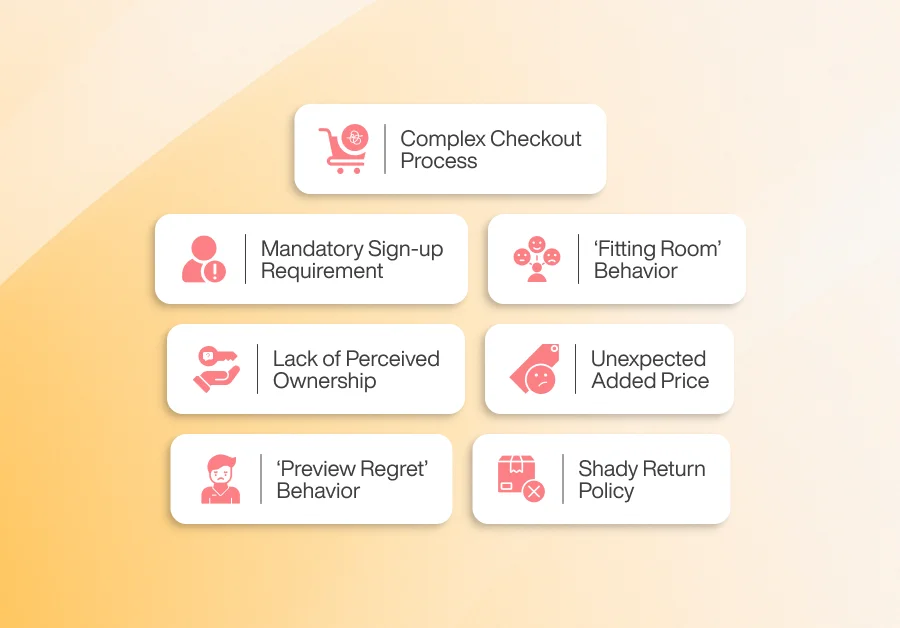
The reasons behind cart abandonment include a complex checkout process, slower speed, customers using the cart as a ‘fitting room’, and experiencing ‘preview regret’. Customers do not just abandon carts without a reason. To reduce cart abandonment, it is essential to understand the reasons behind it. So, here are 7 issues that mostly lead to cart abandonment:
1. Complex Checkout Process
A complex checkout process that lacks a logical flow or has too many steps can overwhelm customers. Most customers do not want to spend too much time typing their detailed info in the checkout box. This is the most common reason businesses lose customers at the cart. According to Baymard’s chart, 18% US customers leave without purchasing because of the complex checkout process.
2. Mandatory Sign-up Requirement:
This is another widespread cause of cart abandonment in the ecommerce industry. As a customer, I never like to create accounts on every site I visit. An easy checkout is always my priority. Just like me, 26% of customers (according to a Baymard study) leave their carts if they are forced to create an account. Businesses that have a policy of signing up before purchasing mostly lose customers at the cart. Customers are reluctant to share their information at the first purchase, unless they are committed to making frequent purchases from the store.
3. ‘Fitting Room’ Behavior Among Customers
Customers often use the cart as a makeshift fitting room to compare products, evaluate them, and simulate their use later on. Many do not add products, intending to buy immediately, which has been recognized as the ‘Fitting Room’ behavior by a study on customer psychology (Jiang & Turut). This is, unfortunately, a significant contributor to the rising cart abandonment rates. Especially if you are running a POD business, customers often leave the cart after designing and putting their designs halfway. If stores do not support iterative exploration, they tend never to come back.
4. Lack of Perceived Ownership in the Cart
Customers want to feel a sense of ownership, even when they did not buy the product. If they do not feel like the product is taken just when the customer has added it to the cart, the conversion momentum weakens, and customers lose interest. A study on the effect of personalization on cross-buying (Kwon, Bock & Hwang) reveals that the ‘endowment effect’ doesn’t kick in strongly for many online ad-hoc items unless customers feel an emotional attachment. The same is true for the cart experience; if it cannot build an emotional experience, customers feel distant and leave. This study also revealed that 33% customers are less likely to abandon the cart if they feel some sort of ownership impression.
5. Unexpected Added Price
Nothing will sway customers faster than adding additional fees at checkout. Customers will feel deceived and leave the cart without completing the purchase. Especially when it comes to customized products, businesses often add unexpected weight charges or print cart at the checkout, which has not been declared previously. Studies reveal that economic perception interacts with emotional ambivalence, which ultimately leads to cart abandonment.
6. ‘Preview Regret’ Behaviour
This cause is unique to the Personalized product businesses. Customers often go through the phase of ‘Preview Regret’ or personalization anxiety. When stores do not offer a real-time preview, customers feel like every item they add is a final decision, and their mistakes cannot be undone. Because of this hesitation, customers either delay or abandon the cart. Unlike a regular item, each mistake in the customized item feels more personal, and customers go through a series of questions roaming in their heads. Studies found cart abandonment goes up as customers feel more pressure to make mistakes or feel like it’s permanent.
8. Shady Return Policy
Stores that do not clearly explain how and when products can be returned in the event of an issue will lose customers at checkout. Customers want to be clear when they are purchasing from an online store. Shady return policies do not provide clarity to customers, which makes them doubt the store and causes them to leave the cart.
8 Proven Ways to Reduce Cart Abandonment in Personalization Business
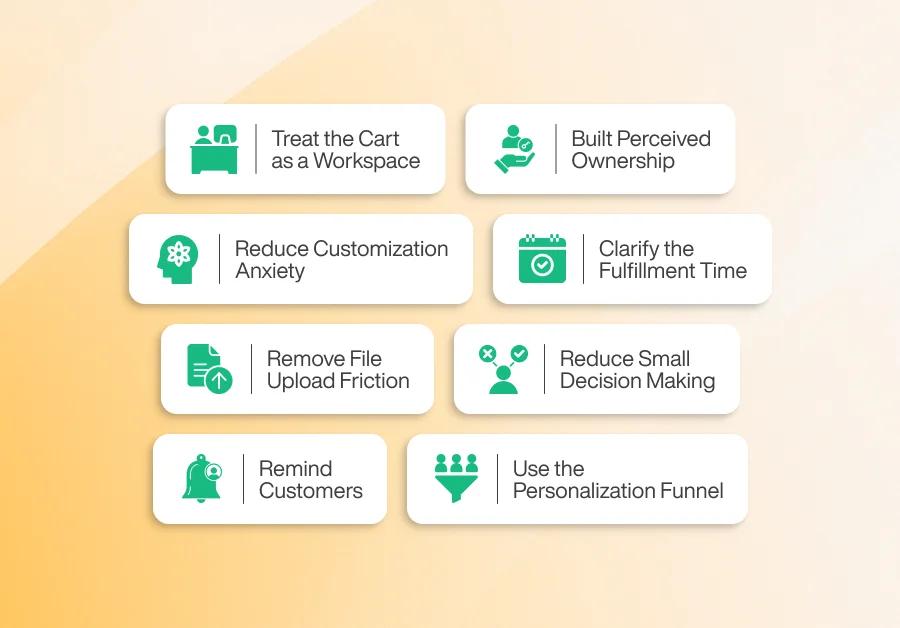
Proven methods, such as making a cart appear as a workspace, managing fulfillment expectations, minimizing upload issues, and addressing security concerns, often contribute to reducing the cart abandonment rate. If all the issues are addressed perfectly, you can actually win customers and reduce the overall cart abandonment issue. So let’s jump into it and see the proven ways:
1. Treat the Cart As A Workspace, Not Just as a Checkout Step
Many shoppers are simply browsers, coming to your store to test out products. They add items to the cart just to test it out and compare. They never intend to buy immediately. As sad as it sounds, you can actually use it to your benefit and cater to the customers to test and try. So they can come back later and increase their purchase. By treating the cart as a transitional research area, you can reduce false negatives and convert browsers into later purchasing customers.
Baymard’s study repeatedly finds that a significant number of cart abandonments are simply because ‘I was just browsing/ not ready to buy’. Their study also reveals that 70% of average abandonment is caused by low-intent browsing, which can be reactivated if stores support multi-session continuity. This is specifically true for the personalized business owner, because customers complement with their customized items, fulfill all their queries, and then make the purchase.
Now, if you actually want to make it work, here are a few things you can do:
- Include an autosave option for the designs and create a ‘My Draft’ workspace. Where the designs and work in progress will be saved, and all the preview history must be saved.
- Offer shareable links to users so they can collaborate with friends/ family to ensure they feel confident in their design.
- Provide a ‘Finish Later’ URL option, so customers can mail it to their email and come back to finish their incomplete work whenever they want.
To measure the results, an A/B test will be conducted to see the metrics. A/B tests: ‘Save as Draft + resumed links’ vs the Standard cart. Track: % of draft resumes that converted to purchase. Additionally, you can view the track of the proportion of the draft created, the time it took to resume the draft, and the resumed draft that has been converted into a purchase to understand the impact.
2. Built Perceived Ownership During Customization to Trigger the Emotional Attachment
The more you can make a customer feel like the product belongs to them, the greater your chances of selling it to them. Even before the actual purchase is made, it is best to make the customer feel like the item belongs to them, and they are more likely to complete the payment process. This is a simple psychological principle that the imaginary touch metaphor and sensory cues increase perceived ownership and trigger emotional attachment.
The classic consumer research by OUP Academic finds that ‘mere touch’ or vivid imagery of possession increases willingness to buy, a phenomenon also known as the endowment effect. In the personalization business, the touch means providing customers with dazzling, interactive previews and contextual visuals that encourage mental ownership.
So ensure customers feel the ownership. Here are some actions you can take:
- Use high-quality previews so customers feel like they are seeing it in real life. You can use 3D, photorealistic mockups, AR, and many other methods to create that realistic feel.
- Use microcopy like ‘This is Your Designs’, ‘See it On You’, ‘Hold Your Design in Real-time’ to encourage possession farming.
- For high-value products, you can offer low-cost physical samples, so customers can be satisfied with their purchase.
To measure the results, conduct an A/B test comparing photorealistic previews with flat previews. Compare the metric test on ‘Add to Cart’ that converts into a purchase with the time spent in previews. You also need to track the preview interactions per session and the correlation between conversions.
3. Reduce Customization Anxiety and ‘Preview-regret’ with Safe Edit Options
Customized product purchases are more emotional than those of any other traditional product. Which makes it feel more permanent, and every mistake feels personal. Shoppers fear that mistakes on personalized products will be irreplaceable; it might be the name they have chosen or perhaps the spelling they fear will not be accurate. Here, you can include reassuring and non-punitive edit options to reduce customers’ anxiety and convert anxious buyers.
A study on Personalization shows a ‘privacy-personalization paradox’. This means there needs to be a balance between creative freedom and reassurance. Customers are very sensitive to perceived risks and permanence in customized decisions, which can lead to hesitation and cart abandonment. To ensure this doesn’t happen here, a few things you can do:
- Display an ‘undo’ and ‘history’ button in the cart, allowing customers to return to their original position easily. This way, customers can experiment without fear.
- Offer a pre-fulfillment edit window, allowing customers to return and edit their designs at any time within a specified period. This will make customers feel less locked in and more confident about making the purchase.
- Display a clear ‘How will we print?’ tooltip that shows the grid and bleed area lines, and include an automatic text checker so customers are not concerned about making a spelling mistake.
To measure the results, do the A/B test by adding ‘free edit within 48 hours’ vs no-edit guarantee. See the metrics on conversion lift and post-purchase edit requests. Also track the frequency of pre-checkout edits and abandonment rates after the first preview.
4. Clarify the Fulfillment Time and Return Policies
Customers dislike seeing unclear and lengthy lead times when it comes to customized products. They will rather abandon the cart rather than miss a deadline or face variable delivery. No shopper will accept the delay of a product if it was specially ordered for Christmas or a birthday. Being transparent about the timeline from the very beginning of the purchase journey, possibly from the homepage, will significantly reduce the cart abandonment rate.
Multiple industry research studies found ‘unexpected shipping costs and delivery time’ as the top causes for cart abandonment. For customized items, unclear production time is even more deadly. It is directly perceived as a fulfillment risk. To avoid such risks, follow these:
- Showcase the production calendar from the beginning of the purchase journey. So, customers know what they can expect when trying to order the product.
- Add a live production tracking bar on your customer’s end. So customers can track the stage their product is in. You can add the tracker to the customer’s dashboard or send it to them directly via email.
- Showcase a clear return policy and offer a conditional return guarantee for high-value customized items. For example, you can offer a reprint and refund if the item is delivered late, or perhaps offer to return it within 2 days if any issues are found for free.
To measure the results, conduct an A/B test: compare the exact calendar ETA with generic slogans. Review the metrics for checkout conversion and post-order complaints regarding delivery. Track the abandonment rate at checkout when lead time is shown versus when it’s hidden.
5. Remove File Upload Friction and Make the Asset Handling Instant
Remove all the upload frictions from your stores to ensure customers are not losing interest. Asking customers to upload, crop, resize, and troubleshoot their files creates technical frictions. This hampers the creative flow and makes customers uninterested in completing their purchase. Many personalized stores ask their customers to upload their files at the end and include restrictions that are too complicated for the customers to understand. This overwhelms customers and makes them.
Also, UX issues can contribute to such frictions. A study on UX research found that poor mobile designs, slow image upload flows, and complicated technical requirements are common issues that trigger cart abandonment. This study also states that personalization upload friction is the core issue. So, how can you solve it completely? Here are a few ways:
- Provide instant crop, background removal, and resolution warning. Also, suggest fixes along the way rather than waiting for the cart to appear.
- Support direct upload of files and photos from the mobile with one tap ‘use mobile’ options to keep the flow and auto formatting product steps.
- Clarify file upload and privacy issues at the time of upload. So customers do not feel at risk or abandon cart without even seeing it.
To measure the results, conduct A/B testing using the basic upload field vs the enhanced instant preview and mobile camera flow. Analyze the metrics of the number of upload retries per user and the time to successful uploads, and their correlation with the cart abandonment during customization.
6. Reduce Small Decision Making with Pre-made Templates
Taking too many decisions at a time makes customers feel overwhelmed. It can cause decision fatigue and eventually lead to abandoning the cart midway. Pre-defined templates and Persona-based defaults are at your rescue. They serve creative control and reduce paralysis at the same time.
A well-done personalization leads to higher revenue, and there is no doubt about it. According to reports, personalization generates 40% more sales. But personalization must be guided. Unchecked choices can backfire and hinder the overall purchase journey, often leading to higher cart abandonment rates. Here are some ways you can address the issue and resolve it:
- Offer personalized styles to the customers that apply consistently, be it color, fonts, or even image choices.
- Use machine learning to suggest templates based on product categories, country, and the user’s past behavior.
- Provide a one-click option to apply the suggested style, which will transform the customers’ designs and make them feel content with the result.
To understand the results, conduct an A/B test using the full choice menu versus the template with smart default data. See the metrics of time-to-time checkout and abandonment due to decision-making. Also, track the proportion of users using suggested templates and their conversion rates to understand results better.
7. Remind Customers of their Unfinished Designs and Use the Zeigarnik Effect
Cart abandonment reminders are a super-effective way to revive abandoned carts. Multi-session reminders can reactivate customers’ interest by showing their unfinished designs. It triggers the psychological drive to complete what was started. However, the timing and visual representation of how you show it do matter a lot.
The Dergipark study on psychological triggers and Zeigarnik effect shows that incomplete tasks remain cognitively effective and can be nudged to completion. In the personalization business, cart abandonment emails showcasing unfinished designs perform significantly better than generic abandoned cart emails. Here are some quick fixes you can implement:
- Send reminders to your customers that include the live URL of the designs so they can jump right back, and a strong CTA that calls for them to finish the design.
- Offer time-limited incentives upon completing the purchase. You can include texts like ‘finish your design now and unlock 10% discounts’ or ‘Complete the purchase in 30 hours to get free shipping’.
- Use on-site banners if customers return with a different device. Show them the saved designs immediately so they can start right away.
Measure the results of this method by doing an A/B test using the previewed reminder emails vs the standard abandoned cart mail data. Analyze the metrics of opened emails that have converted into resuming the design and see the purchase rate through the funnel. Also, track time between interruptions and resumes.
8. Use the Personalization Funnel and Run Targeted Experiments
You need to use a personalization tactic to ensure customers receive exactly what they want, thereby reducing cart abandonment. Generic metrics hide the behavioural subtypes that matter for a personalized flow. You must identify the subtypes and pinpoint the real leak points that contribute to cart abandonment.
Several predictive analytics studies show that companies achieve a higher ROI when they utilize post-behaviors, such as preview interactions, edits, and uploads, to run targeted interventions per segment. Here are ways to address the method:
- Utilize the data from the events, such as editor opened and closed times, preview time spent, and edits after adding to cart.
- Experiment with personalization segments for each type of customer. For example, a user who previews for more than 10 seconds but doesn’t complete the purchase should receive discounts immediately when they try to leave. Alternatively, a user who has attempted to upload files more than once should have the simplified and guided upload flow tested on them.
- Run an A/B test per segment and report each one vs the cost. Track the lifetime value of reactivated users versus new users to understand the overall impact on your business.
Cart Abandonment Prevention Checklist for Personalized Products
To prevent cart abandonment, this checklist is all you need. Implement and maintain the checklist to get your desired results:
✔ Product previews load in under 3 seconds
✔ Customization price updates instantly while designing
✔ Checkout has no more than 2 steps
✔ Guest checkout is enabled and easy to find
✔ “Save my design for later” option enabled
✔ Mobile customization and checkout are fully optimized.
✔ All extra costs are shown before checkout.
✔ High-quality preview or 3D/mockup available for personalized items.
✔ Uploads are fast, error-free, and mobile-friendly
✔ Clear production time and return policy shown near “Add to Cart”
✔ Choice overload minimized with templates + guided customization
✔ Auto-save enabled for customization progress
✔ Trust signals (reviews, social proof, secure badges) visible on cart page
✔ Send first abandonment email within 5–15 minutes (with their design image)
✔ Dynamic retargeting uses the exact customized design preview
✔ Analytics track key personalization drop-off points
Now, how to use this checklist efficiently, you might ask? Here’s how you can use it efficiently:
- Review the checklist weekly and update the status accordingly each week. You can also score each item to track the progress each week.
- Items mentioned in 1, 2, and 3 are foundational. On the other hand, items 4, 5, and 7 involve more product and UX work.
- Measure the baseline of your store before recording the changes. You need to record the details of each aspect to understand the impact of each method fully.
- Use item 10 to identify the biggest leak point and focus most of your efforts on that point.
Concluding Words
Cart abandonments are a painful loss for ecommerce owners. When customers leave after completing only half of the journey and do not return, it severely affects the website’s performance and overall customer value.
To uncover the unseen reasons, you need to delve deeply into the customer’s mind and understand their psychology. Losing a customer at the end moment is just a complex UX or customers’ hesitation away. Especially when it comes to personalization businesses, you need to be extra careful.
We have gathered proven strategies that help you reduce your cart abandonment rate and address the issues that actually lead to abandonment. With the research-backed methods, you will reduce the cart abandonment rate and win customers over.
FAQ’s: Reduce Cart Abandonment in Personalization Business
What is a good cart abandonment rate for eCommerce?
Cart abandonment varies by industry, but globally the average is around 70% (Baymard Institute, 2024). A “good” or healthy rate is typically below 60%. For customized or personalized product stores, even 65-70% can be normal due to higher cognitive load during configuration.
Is cart abandonment always negative?
No. Some abandonments are actually “research-driven abandonments.” Customers add items to compare prices, save options, or think later. Retargeting steps, such as reminders, saved carts, and design history features, can help convert these users later.